

The $480,000 approx. Mistake Made on Day One
Three months before launch, the founding team of a promising B2B SaaS startup gathered for what should have been a celebration. They’d just finished their MVP. The UI looked great. The core features worked. Investors were excited.
Then their technical advisor asked a simple question: “How are you handling multi-tenancy?”
Silence.
“You ARE building this as a multi-tenant, right? You can’t scale a B2B SaaS without proper tenant isolation.”
More silence.
The truth emerged slowly, painfully: The entire application had been built as a single-tenant system. Every “customer” would need their own deployment, their own database, their own infrastructure.
The cost to refactor? $480,000 approx. and six months of delay.
The market opportunity window they were targeting? Closing in four months.
They didn’t make it.
This isn’t a story about incompetent developers. The team was talented. But they made the three fatal mistakes that kill SaaS applications before they launch:
- Architecture decisions made without understanding SaaS-specific requirements
- No systematic approach to preventing technical debt during rapid development
- Launch timeline pressure causing shortcuts that become permanent problems
Here’s the framework that prevents these mistakes—and gets you from concept to successful launch in 90 days.
The SaaS Success Framework: 90 Days from Concept to Launch
Building a SaaS application isn’t the same as building a traditional web application. The requirements are fundamentally different:
Traditional Web App:
- Single customer (you)
- Predictable load
- Manual scaling acceptable
- Downtime during off-hours okay
- Single database instance
SaaS Application:
- Hundreds/thousands of customers
- Unpredictable, spiky load
- Automatic scaling required
- 99.9%+ uptime expected
- Multi-tenant architecture essential
Get these foundations wrong, and you’re building on sand. Get them right, and you build once and scale infinitely.
Phase 1: Architecture & Foundation (Weeks 1-3)
Week 1: Requirements Architecture & Technical Design
The Fatal Mistake: Jumping straight into coding without defining SaaS-specific requirements.
The Right Approach:
Day 1-2: Business Model Clarity Before writing a single line of code, crystallize your SaaS business model:
- Pricing structure: Per-seat? Per-usage? Tiered?
- Customer segmentation: SMB? Mid-market? Enterprise?
- Feature differentiation: What’s in Free vs Pro vs Enterprise?
- Billing cycle: Monthly? Annual? Both?
- Trial strategy: Free trial? Freemium? Demo-only?
Why this matters technically: Your business model dictates your data architecture. Per-seat pricing requires different user management than per-usage. Enterprise features require role-based access control (RBAC) from day one.
Day 3-4: Multi-Tenancy Architecture Decision
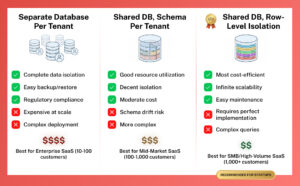
This is THE most critical decision in SaaS architecture. You have three approaches:
Option 1: Separate Database per Tenant
- Pros: Complete data isolation, easy backup/restore per customer, regulatory compliance simplified
- Cons: Expensive at scale, complex deployment, harder to maintain
- Best for: Enterprise SaaS with high-value customers, regulated industries (healthcare, finance)
Option 2: Shared Database with Schema per Tenant
- Pros: Better resource utilization than separate DBs, good isolation
- Cons: More complex than single schema, potential for schema drift
- Best for: Mid-market SaaS, moderate number of tenants (<1,000)
Option 3: Shared Database, Shared Schema, Row-Level Isolation
- Pros: Most cost-efficient, easiest to maintain, infinite scalability
- Cons: Requires perfect implementation (one bug = data leak), complex queries
- Best for: High-volume SMB SaaS, freemium models, thousands of tenants
Our recommendation for most SaaS startups: Option 3 (shared database, row-level isolation)
- Start cost-efficient
- Scale to thousands of customers
- Upgrade specific high-value customers to dedicated infrastructure later
Day 5-7: Core Technical Architecture
Document these critical decisions:
Authentication & Authorization:
- Authentication provider (Laravel Sanctum, Passport, or third-party like Auth0)
- Multi-factor authentication (required for enterprise customers)
- Single Sign-On (SSO) support (SAML for enterprise)
- Role-based access control (RBAC) design
Data Layer:
- Database choice (PostgreSQL recommended for robust multi-tenancy)
- Caching strategy (Redis for sessions, query cache, rate limiting)
- Search implementation (Elasticsearch/Algolia for tenant-scoped search)
- File storage (S3 with tenant-scoped buckets)
API Design:
- RESTful vs GraphQL (REST for simplicity, GraphQL for flexibility)
- API versioning strategy (critical for backward compatibility)
- Rate limiting per tenant (prevent abuse, ensure fair usage)
- Webhook support (for integrations)
Infrastructure:
- Queue system (Redis/SQS for async processing)
- Email service (Postmark/SendGrid with tenant branding)
- Monitoring (Sentry for errors, DataDog/New Relic for performance)
- Deployment strategy (zero-downtime required)
Deliverable: Complete technical architecture document that prevents the around $480K mistake.
Week 2: Database Design & Multi-Tenant Foundation
The Fatal Mistake: Bolting multi-tenancy onto existing code later.
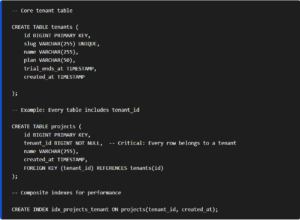
The Right Approach: Build tenant isolation into every layer from day one.
Database Schema Design:
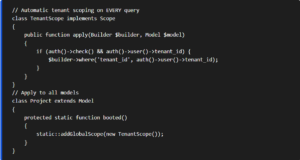
Laravel Implementation (Global Scopes):
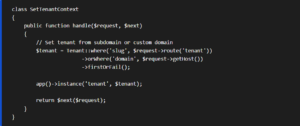
Critical: Tenant Context Middleware
Week 2 Deliverables:
- Complete database schema with tenant isolation
- Global scopes preventing accidental cross-tenant data access
- Tenant context middleware
- Automated tests proving data isolation
Week 3: Core Authentication & Billing Foundation
The Fatal Mistake: Treating authentication and billing as “features to add later.”
The Right Approach: They’re the foundation. Everything builds on them.
Authentication System:
- User registration with email verification
- Password reset flows
- Session management (with Redis for multi-server support)
- Remember me functionality
- Account lockout after failed attempts (security)
- Invitation system (for team accounts)
Team/Organization Structure:
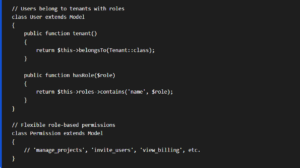
Billing Integration (Stripe/Paddle):
Critical billing workflows to implement:
- Trial Management:
- Start trial on signup
- Grace period after trial ends
- Automatic downgrade to free tier (if offering freemium)
- Email reminders (7 days before, 3 days before, day of expiration)
- Subscription Management:
- Plan selection and checkout
- Prorated upgrades/downgrades
- Cancellation (with optional pause/downgrade offers)
- Failed payment handling (retry logic, dunning emails)
- Usage Tracking (if usage-based pricing):
- Real-time usage metering
- Usage alerts (approaching limits)
- Overage billing
- Usage-based invoicing
Week 3 Deliverables:
- Complete authentication system with team support
- Stripe/Paddle integration
- Trial and subscription workflows
- Billing webhook handlers (for payment success/failure)
Phase 1 Results: You now have a bulletproof foundation that won’t need to be rewritten.
Phase 2: Core Features & MVP (Weeks 4-7)
Week 4-5: Primary Features Development
The Fatal Mistake: Building too many features, half-finishing all of them.
The Right Approach: Identify the 3-5 features that define your MVP. Build them completely.
Feature Prioritization Framework:
Must Have (Build in Week 4-5):
- Features that define your core value proposition
- Without these, the product has no reason to exist
- Example for a project management SaaS: Projects, Tasks, Team collaboration
Should Have (Build in Week 6-7):
- Features that significantly improve the experience
- Important but not deal-breakers
- Example: File attachments, Comments, Activity timeline
Nice to Have (Post-Launch):
- Features that add polish
- Can be added based on customer feedback
- Example: Gantt charts, Time tracking, Advanced reporting
Will Not Have (For MVP):
- Advanced features for later versions
- Enterprise features that can wait
- Example: SSO, Advanced permissions, Custom integrations
Development Best Practices During Rapid Build:
- Feature Flags for Progressive Rollout:

Prevents “big bang” releases. Roll out features to 10% → 50% → 100% of users.
- API-First Development:
Build every feature as an API endpoint first, then build UI on top:
- Forces clean separation of concerns
- Makes testing easier
- Enables mobile app later
- Allows third-party integrations
- Test Coverage for Critical Paths:
You can’t test everything in an MVP. Focus testing on:
- Authentication flows
- Payment processing
- Data isolation (tenant security)
- Core feature happy paths
Aim for 70%+ coverage on critical paths, not 100% on everything.
Week 6-7: Polish, Performance, and Security Hardening
The Fatal Mistake: Launching with “we’ll fix performance issues when we have users.”
The Right Approach: Performance and security issues PREVENT you from getting users.
Performance Optimization:
Database Query Optimization:
- Add indexes for all foreign keys
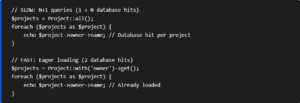
- Eager load relationships (eliminate N+1 queries)
- Implement pagination (never load all records)
- Cache frequent queries (using Redis)
Example N+1 Query Fix:
Caching Strategy:
- Query cache: Expensive queries cached for 5-60 minutes
- View cache: Entire rendered views cached
- Object cache: Models cached (user profiles, settings)
- CDN: Static assets served from edge locations
Security Hardening:
Critical Security Checklist:
- SQL Injection Prevention (Laravel’s query builder handles this)
- XSS Prevention (Blade templating escapes output automatically)
- CSRF Protection (enabled by default in Laravel)
- Rate Limiting (API endpoints and login forms)
- HTTPS Everywhere (redirect HTTP → HTTPS, HSTS headers)
- Secure Headers (Content Security Policy, X-Frame-Options)
- Input Validation (server-side validation on all forms)
- File Upload Security (type checking, size limits, virus scanning)
- Dependency Updates (automated security patches)
Security Testing:
- Run automated security scanner (Snyk, OWASP ZAP)
- Penetration testing (even basic testing catches 80% of issues)
- Third-party audit (if handling sensitive data)
Phase 3: Pre-Launch & Launch (Weeks 8-12)
Week 8-9: Testing, Bug Fixes, and Documentation
The Fatal Mistake: “We’ll write documentation after launch when we have time.”
The Right Approach: Documentation drives adoption. No docs = no users.
Testing Strategy:
Automated Testing:
- Unit tests for business logic
- Feature tests for user workflows
- API tests for endpoints
- Browser tests for critical paths (using Laravel Dusk)
Manual Testing:
- QA checklist for all features
- Cross-browser testing (Chrome, Firefox, Safari, Edge)
- Mobile responsive testing
- Accessibility testing (basic WCAG 2.1 compliance)
Load Testing:
- Simulate 100 concurrent users
- Identify bottlenecks
- Optimize before they become problems
Documentation to Create:
User Documentation:
- Getting started guide
- Feature documentation
- FAQ section
- Video tutorials (even basic screen recordings help)
Developer Documentation (if offering API):
- API reference
- Authentication guide
- Code examples
- Postman collection
Internal Documentation:
- Runbook for common support issues
- Deployment procedures
- Disaster recovery plan
- Monitoring and alerting setup
Week 10: Staging Environment & Beta Testing
Deploy to Production-Like Staging:
Your staging environment should mirror production exactly:
- Same infrastructure (load balancer, multiple app servers)
- Same database type and version
- Same caching and queue systems
- Same third-party integrations (using test mode)
Beta Testing Program:
Invite 10-20 beta users from your target audience:
Beta User Criteria:
- Represent your ideal customer profile
- Willing to provide detailed feedback
- Understand it’s pre-launch (set expectations)
- Diverse use cases (stress different features)
Beta Testing Focus:
- Usability issues (where do users get confused?)
- Bug discovery (what breaks in real usage?)
- Performance under real load
- Feature gaps (what’s missing that they need?)
- Pricing validation (will they pay?)
Feedback Collection:
- In-app feedback widget (Hotjar, UserVoice)
- Weekly check-in calls with each beta user
- Usage analytics (Mixpanel, Amplitude)
- Session recordings (see where users struggle)
Week 11-12: Launch Preparation & Go-Live
Pre-Launch Checklist:
Technical:
- All critical bugs fixed (prioritize ruthlessly)
- Performance tested and optimized
- Security audit completed
- Backup and disaster recovery tested
- Monitoring and alerting configured
- Error tracking (Sentry) configured
- Analytics (Google Analytics, Mixpanel) installed
- Uptime monitoring (UptimeRobot, Pingdom)
Business:
- Pricing pages live
- Checkout flow tested end-to-end
- Payment processing verified (test purchases)
- Email templates professional and branded
- Support system ready (help desk software)
- Terms of Service and Privacy Policy published
Marketing:
- Landing page optimized for conversion
- Demo video created
- Blog post announcing launch
- Email list ready (if you’ve been building one)
- Social media posts scheduled
- Product Hunt launch planned (if relevant)
Launch Day Execution:
Hour 1-4: Soft Launch
- Deploy to production
- Verify all systems operational
- Process test transaction
- Invite beta users to purchase
Hour 4-8: Monitored Expansion
- Announce to email list
- Social media announcement
- Monitor error rates, performance
- Support team standing by
Hour 8-24: Full Launch
- Product Hunt launch (if doing)
- Paid ads campaigns (if budget allows)
- Press outreach (if you have relationships)
- Monitor sign-ups, conversions, errors
The Three Fatal Mistakes—And How to Avoid Them
Fatal Mistake #1: Architecture Decisions Without SaaS Expertise
The Problem: Single-tenant architecture, no scaling plan, no multi-tenancy from day one.
The Solution:
- Use the Phase 1 framework (Weeks 1-3) BEFORE coding
- Get architecture review from SaaS expert
- Build multi-tenant from day one, even if you have one customer
- Plan for 10x scale, build for current need
Cost of Mistake: $480K refactor + 6 months delay Cost of Solution: $15K architecture consulting upfront
Fatal Mistake #2: Technical Debt Accumulation During Rapid Build
The Problem: “We’ll clean this up later” becomes permanent.
The Solution:
- Enforce code review (even if reviewing your own code next day)
- Write tests for critical paths during development, not after
- Refactor as you go (Boy Scout Rule: leave code better than you found it)
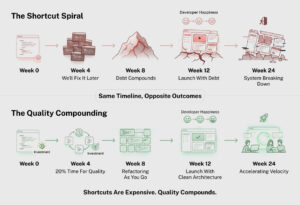
- Allocate 20% of time to technical debt paydown
Cost of Mistake: 40% slower development velocity long-term Cost of Solution: 20% time investment during build = 3x faster later
Fatal Mistake #3: Launch Timeline Pressure Causing Permanent Shortcuts
The Problem: Shortcuts taken to hit launch date become unfixable.
The Solution:
- Ruthless scope cutting (build fewer features completely)
- Launch with 3 perfect features, not 10 half-built ones
- Build for post-launch iteration (feature flags, API-first)
- Accept that MVP is minimum VIABLE, not minimum possible
Cost of Mistake: Unusable product that gets bad reviews Cost of Solution: Extra 2-4 weeks for quality = successful launch
Conclusion: The 90-Day Framework vs The 2-Year Nightmare
Two paths to launching a SaaS application:
Path 1: The 2-Year Nightmare
- Start coding without architecture planning
- Discover multi-tenancy problem 6 months in
- Around $480K refactor + 6 months delay
- Launch with technical debt
- Slow iteration, high bug rate
- Customer churn due to quality issues
- 2 years to profitability (if you make it)
Path 2: The 90-Day Framework
- 3 weeks architecture and foundation
- 4 weeks core feature development
- 3 weeks polish, performance, security
- 2 weeks testing and beta
- Launch with solid foundation
- Fast iteration, low bug rate
- Customer success and retention
- 6-12 months to profitability
The difference?
- Better architecture from day one
- Systematic prevention of technical debt
- Quality over speed (which makes you faster)
The investment?
- $40K-$60K approx. for proper SaaS development (vs $15K-$25K for rushed build + around $480K refactor)
- 90 days to launch (vs 180 days rushed + 180 days fixing)
The math isn’t close.
Your SaaS application deserves to be built right the first time.
Because in SaaS, there’s no such thing as a “temporary” architecture decision.
You’re building the foundation of your business.
Build it to last.

Faheem Hasan
Brings over 12+ years of specialized experience in web and Laravel application development, backed by a proven 99.9% reliability record across enterprise-grade environments. As a driving force behind Laracore’s vision, he leads with precision and innovation—delivering robust, high-performance Laravel maintenance and development solutions that meet the highest global standards.