The $50,000 Security Breach: Why Skipping Laravel Security Updates Is Playing With Fire
“We’ll update next month when things slow down.”
Famous last words before a security breach that could have been prevented with a 20-minute patch deployment.
According to IBM’s Cost of a Data Breach Report 2024, the average cost of a data breach for small to medium businesses is $2.98 million globally, with smaller incidents still averaging $50,000-$150,000 when factoring in investigation, remediation, legal fees, and reputation damage.
For Laravel applications handling customer data, payment information, or sensitive business operations, skipping security updates isn’t just risky—it’s gambling with your company’s future.
Here’s what most business owners don’t realize about the real cost of postponing security updates.
The Vulnerability Window: How Hackers Exploit Delay
When a security vulnerability is discovered in Laravel, PHP, or any dependency your application uses, a predictable pattern unfolds:
Day 0: Vulnerability discovered and reported Day 1-7: Security patch developed and tested Day 7: Public security advisory released with patch Day 7+: The race begins
Once a security advisory becomes public, attackers have a roadmap. They know exactly what the vulnerability is, which versions are affected, and how to exploit it.
Every application running the vulnerable version becomes a target.
The window between patch release and your deployment is your period of maximum risk. During this time, automated scanners are actively searching for unpatched applications to exploit.
Real-World Example: The 30-Day Delay That Cost $80,000
Last year, we onboarded a client after they experienced a security incident. Here’s what happened:
A critical Laravel security patch was released on January 15th, addressing an SQL injection vulnerability in query handling under specific conditions.
The company’s internal team was “too busy” with feature development to apply the update. They planned to handle it during their next maintenance window at month’s end.
On February 8th—24 days after the patch release—their application was compromised through the exact vulnerability that had been publicly disclosed.
The damage:
- Customer database accessed (45,000 records)
- Credit card processing temporarily disabled by payment processor
- Emergency forensic investigation: $15,000
- Legal consultation and compliance review: $12,000
- Customer notification and credit monitoring: $28,000
- Lost revenue during 3-day shutdown: $18,000
- Reputation damage: Incalculable
Total quantifiable cost: $73,000
The security update would have taken 20 minutes to apply and test.
What “Regular Security Updates” Actually Means
Many businesses think they’re handling security because they update “when something seems important.” This reactive approach creates dangerous gaps.
Professional security maintenance follows a systematic approach:
Monthly Laravel Core Updates
Laravel releases security patches as needed, typically coordinated with the broader PHP ecosystem. These updates address:
- Authentication bypass vulnerabilities
- SQL injection risks
- Cross-site scripting (XSS) prevention
- Session handling improvements
- Encryption and hashing updates
PHP Version Security Patches
PHP itself receives regular security updates. Running an outdated PHP version exposes your application to:
- Remote code execution vulnerabilities
- Memory corruption issues
- Type confusion exploits
- File system access vulnerabilities
Dependency Security Audits
Your Laravel application likely uses 50-100+ Composer packages. Each one can introduce vulnerabilities:
- Third-party authentication libraries
- Image processing packages
- PDF generation tools
- API integration packages
- Database abstraction layers
Tools like composer audit identify known vulnerabilities in your dependency tree, but someone needs to act on those findings.
Server and Infrastructure Updates
Beyond application code, your hosting environment needs maintenance:
- Operating system security patches
- Web server (Nginx/Apache) updates
- Database server (MySQL/PostgreSQL) patches
- SSL/TLS certificate renewals
- Firewall rule updates
Skipping any layer creates potential entry points for attackers.
The Cascade Effect of Security Negligence
Security vulnerabilities don’t exist in isolation. A single unpatched weakness can provide attackers with the foothold they need to:
Step 1: Initial Compromise An unpatched SQL injection vulnerability allows database access.
Step 2: Privilege Escalation Attackers use database access to create admin accounts or modify user roles.
Step 3: Data Exfiltration With administrative access, sensitive data is copied: customer information, payment details, proprietary business data.
Step 4: Persistence Backdoors are installed to maintain access even after the initial vulnerability is patched.
Step 5: Lateral Movement If your application connects to other systems (APIs, internal tools, third-party services), attackers pivot to compromise those as well.
By the time you discover the breach, the damage is extensive and remediation is complex.
Compliance Requirements: It’s Not Just Best Practice
For many businesses, regular security updates aren’t optional—they’re legally required:
PCI DSS Compliance (Payment Processing)
If you handle credit card payments, PCI DSS requires:
- Critical security patches applied within 30 days
- All other security patches within appropriate timeframes
- Regular vulnerability scanning
- Documented patch management procedures
Failure to comply can result in fines of $5,000-$100,000 per month and loss of payment processing privileges.
GDPR (EU Customer Data)
GDPR requires “appropriate technical measures” to protect personal data. This explicitly includes:
- Timely security patching
- Regular security assessments
- Documented security procedures
Breaches due to known, unpatched vulnerabilities can result in fines up to 4% of annual global turnover or €20 million, whichever is higher.
HIPAA (Healthcare Data)
Healthcare applications must maintain security patches as part of the Security Rule’s technical safeguards requirement.
SOC 2 Compliance
Many B2B SaaS companies pursue SOC 2 certification. Regular security patching is a fundamental requirement for the Security and Availability criteria.
The cost of non-compliance often exceeds the cost of a breach itself.
The “We’re Too Small to Be Targeted” Myth
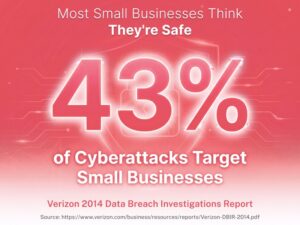
“Why would hackers target us? We’re not a big company.”
This is one of the most dangerous misconceptions in application security.
Modern attacks are largely automated. Attackers use bots that scan thousands of applications per hour, looking for known vulnerabilities regardless of company size.
Your application doesn’t need to be interesting to attackers—it just needs to be vulnerable.
Small and medium businesses are actually preferred targets because:
- They’re less likely to have dedicated security teams
- They often have weaker security practices
- They’re more likely to pay ransoms to restore operations
- They’re less likely to have comprehensive backups
According to Verizon’s 2024 Data Breach Investigations Report, 43% of cyberattacks target small businesses.
The Technical Debt of Postponed Updates
Beyond immediate security risks, skipping updates creates technical debt that compounds over time:
Version Compatibility Issues
The longer you wait to update, the larger the version jump becomes. Updating from Laravel 9.0 to 9.1 is straightforward. Updating from Laravel 8.0 to 11.0 requires significant testing and potential code changes.
Dependency Conflicts
Outdated applications run outdated dependencies. Eventually, you’ll need a feature that requires a newer package version, triggering a cascade of forced updates.
Reduced Developer Productivity
Developers spend time working around bugs and limitations that have been fixed in newer versions. This slows feature development and increases frustration.
Talent Retention Challenges
Good developers want to work with modern, well-maintained codebases. Technical debt drives talent away.
Emergency Update Pressure
When you finally must update (due to a critical vulnerability or incompatibility), you’re forced to rush, increasing the risk of errors and downtime.
The “we’ll do it later” approach becomes exponentially more expensive over time.
What Professional Security Maintenance Looks Like
At Laracore, our security update process is systematic and thorough:
Week 1: Monitoring and Assessment
- Subscribe to Laravel security advisories
- Monitor PHP security announcements
- Track dependency vulnerabilities via automated scanning
- Review security mailing lists and researcher disclosures
Week 2: Patch Evaluation
- Assess severity and applicability to your application
- Identify which updates require immediate deployment
- Plan deployment windows for non-critical updates
- Document changes and potential impacts
Week 3: Testing and Staging
- Deploy updates to staging environment
- Run automated test suites
- Perform manual testing of critical functionality
- Load testing if significant changes
- Security scanning to verify vulnerability resolution
Week 4: Production Deployment
- Deploy during optimal maintenance windows
- Monitor application performance and error rates
- Verify functionality across all features
- Document deployment and maintain rollback capability
This process happens continuously, ensuring your application stays protected while maintaining stability.
The Cost-Benefit Analysis
Let’s compare two scenarios:
Scenario A: Professional Security Maintenance
- Monthly cost: Included in $3,499 maintenance plan
- Security patches applied within 7-14 days of release
- Comprehensive testing before deployment
- Zero security incidents over 12 months
- Annual cost: $41,988
Scenario B: Reactive “Update When We Remember”
- No ongoing maintenance cost: $0
- Average patch delay: 45-60 days
- Limited or no testing before deployment
- One moderate security incident during the year:
- Forensic investigation: $15,000
- Legal review: $10,000
- Customer notification: $8,000
- Lost revenue: $12,000
- Reputation damage and customer churn: $25,000
- Annual cost: $70,000+
Professional maintenance isn’t an expense—it’s insurance that pays for itself.
Beyond Security: What Else Updates Provide
Regular security updates deliver additional benefits:
Performance Improvements Framework updates often include optimization that makes your application faster without code changes.
Bug Fixes Non-security bugs that cause edge-case failures get resolved, improving reliability.
New Features Minor version updates introduce new capabilities you can leverage for feature development.
Better Developer Experience Modern versions of Laravel include improved debugging tools, better error messages, and developer-friendly APIs.
Future-Proofing Staying current makes major version upgrades manageable instead of overwhelming.
These secondary benefits compound over time, making updated applications easier and cheaper to maintain and enhance.
Getting Back on Track
If your Laravel application hasn’t been updated regularly, here’s how to get back on track:
Step 1: Security Audit
Assess your current versions and identify known vulnerabilities. This establishes your risk baseline.
Step 2: Prioritization
Create a prioritized list:
- Critical security updates (deploy immediately)
- Important security updates (deploy within 2 weeks)
- Performance and feature updates (schedule appropriately)
Step 3: Staged Deployment Plan
Don’t try to jump multiple major versions at once. Plan incremental updates with testing between each stage.
Step 4: Establish Ongoing Process
Set up monitoring, automated testing, and a regular deployment schedule to prevent falling behind again.
Step 5: Documentation
Document your current state, update process, and rollback procedures so security maintenance becomes routine.
Conclusion: Security Updates Are Non-Negotiable
In 2026, running an unpatched Laravel application is like driving without seatbelts while texting. It’s not a question of if something will go wrong—it’s when.
The cost of a security breach ($50,000-$150,000+ for a moderate incident) dramatically exceeds the cost of professional maintenance ($3,499/month = $41,988/year).
But beyond the numbers, consider the intangible costs:
- Customer trust, built over years, lost in days
- Your reputation in your industry
- Sleep lost worrying about security
- Time spent dealing with incidents instead of growing your business
Our Laravel Support & Maintenance Plan includes: ✅ Monthly security updates (deployed within 7-14 days) ✅ Dependency vulnerability monitoring and patching ✅ Comprehensive testing before deployment ✅ 24/7 monitoring to detect compromise attempts ✅ Emergency response for security incidents
Don’t wait for a breach to take security seriously.
Ready to Protect Your Application?
Schedule a free security audit to identify current vulnerabilities in your Laravel application. We’ll show you exactly what needs attention and provide a roadmap for getting—and staying—secure.
Your customers trust you with their data. Make sure your application deserves that trust.
Related Resources:

Faheem Hasan
Brings over 12+ years of specialized experience in web and Laravel application development, backed by a proven 99.9% reliability record across enterprise-grade environments. As a driving force behind Laracore’s vision, he leads with precision and innovation—delivering robust, high-performance Laravel maintenance and development solutions that meet the highest global standards.